
Reinstatement premiums
To account for the offset of treaty losses by premiums a field for the entry of reinsurance premiums is now available from the Program Details pane Layer tab for each treaty or layer in all program types (except Catbond).
 Companies > [Company] > Programs > Program Details > Premium >
  > Modify Premiums
Procedure
Furthermore, for program types that support reinstatements (Catastrophe Excess of Loss or Industry Loss Warranty), premium provisions for each reinstatement may be specified.
- In the Program Details pane, locate the layer to adjust.
- Click in the Premium cell for that layer.
-
Click .
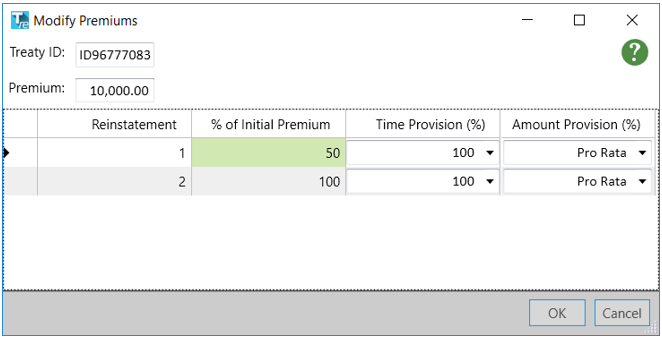
-
In the Modify Premiums dialog make adjustments as necessary:
- % of Initial Premium:(default 100%) Enter a number to indicate percentage of initial premium; number must be zero or greater and can include decimal places.
- Time Provision (%): (default 100%) Select time provision from the menu: 100%, Pro-Rata, or click ‘x’ and enter a percentage [0,100].
- Amount Provison (%): (default Pro-Rata) Select amount provision from the menu: 100%, Pro-Rata, or click ‘x’ and enter a percentage [0,100].
- Click OK.
-
Repeat steps to add more reinstatements and provisions as necessary.
For information on how these premiums translate to losses refer to the discussion of perspectives for Final Net Loss and Net of Premium in the topic Results.