
Query portfolio results save to Cloud
There are a number of queries you can run against saved portfolio results in DBeaver.
Before You Begin
Note: DBeaver requires a one time configuration to be accessible to users. Refer
to the Install and configure topic for
details.
To query results on the Cloud:
Procedure
- In the main Touchstone Re Portfolios pane, select a portfolio.
-
Select Query Cloud Results from the
 drop-down.
-
Locate and open the AIRResult database;select View Data.
Several tables and views will be populated with the results of your portfolio analyses. Items prefixed with "t_" are tables and those prefixed with "v_" are views.
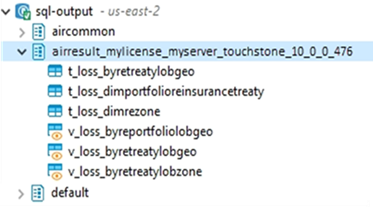
-
Run queries on the results using the DBeaver application. Use the DBeaver online help
for guidance.
Note that it is easier to query using views rather than tables.