Create a DFF
A Damage Factor File (DFF) is a CSV file that contains the fields in the following table.

You typically create a DFF in Excel, or edit an existing file. You can download a sample DFF that contains a single record for each supported area and subarea in the country or countries covered by the selected model. The sample file provides the framework for building a complete event catalog of damage factors.
Procedure
- Select Custom Models.
- Select the check box next to the model for which you want to create a DFF.
-
In the Damage Factor File column, click the down arrow and then click
 to download a sample DFF (based on the selected model) to
a shared folder.
to download a sample DFF (based on the selected model) to
a shared folder.
- To monitor the progress of this task, refer to the Activity Monitor.
- When the download is complete, navigate to the folder and edit the DFF as needed.
Results
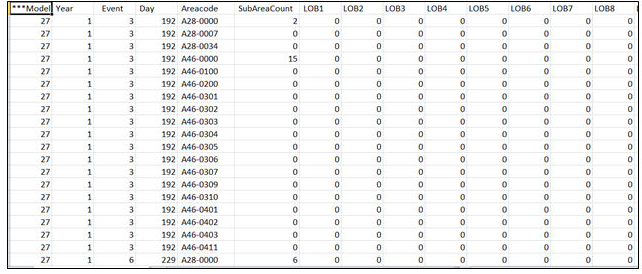
Here is one example of a Damage Factor File (DFF). Model 27 is the Verisk Hurricane Model for the United States.