
You need to run this script on your AIRResult database after every portfolio rollup
analysis.
Before You Begin
Note:
- mylicense and myserver are generic terms and will actually show the
license and server specific to the client installation.
Procedure
-
In the Touchstone Re main Portfolios
pane, select Query Cloud Results from the
drop-down.
-
When the DBeaver main window opens,
-
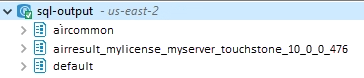
In the left pane, open sql-output to display the databases.
-
Right mouse click on the AIRResult database then select SQL
EditorNew SQL Script.
-
In the right pane, enter the script MSCK REPAIR TABLE
AIRResult_mylicense_myserver_touchstone_10_0_0_476.t_loss_dimportfolioreinsurancetreaty;;
be sure to replace mylicense and myserver with the license and server
specific to your installation.
Important:
- You will need to run this script after every portfolio rollup analysis to view
your data.
- To save the script right mouse click on the script and select Save from
the drop-down.
-
Highlight the full script entry.
-
Click
to run the script.
-
To verify the database was updated, expand AIRResult then right mouse click on a
child database and select View Data.
It is possible to have more than one AIRResult; contact your customer service
representative for more information.
Next Steps
You may now view and query your loss
results.