
Launch Touchstone Re
To launch Touchstone Re, locate and click the
Touchstone Re application icon  on your desktop. The application will open to
the Home page with the Company pane open. If companies exist, they are listed in this
pane.
on your desktop. The application will open to
the Home page with the Company pane open. If companies exist, they are listed in this
pane.
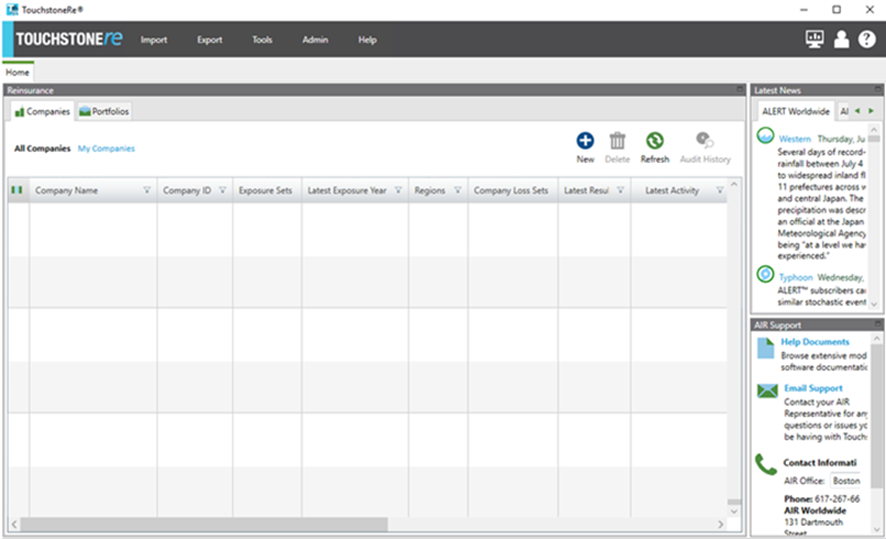
Toggle between the tabs Companies and
Portfolios to view the Companies pane and the Portfolios pane. To
expand the viewing area of either of these panes, click  in the upper right corner; click to
restore the pane to its original size. The Latest News and
AIR Support panes provide useful information such as the latest
news and links to the AIR Client Portal and email support.
Click in the upper right
corner to hide either or both of these panes. The global menu along the top of the Home page
offers quick access to common tasks such as Import, Export, the Activity Monitor and the
Administration Console. Click
in the upper right corner; click to
restore the pane to its original size. The Latest News and
AIR Support panes provide useful information such as the latest
news and links to the AIR Client Portal and email support.
Click in the upper right
corner to hide either or both of these panes. The global menu along the top of the Home page
offers quick access to common tasks such as Import, Export, the Activity Monitor and the
Administration Console. Click  on the far right to quickly bring up Touchstone Re’s extensive online help, which can
guide you through the many features of Touchstone Re. Here are a few recommendations for
sections that help with getting started:
on the far right to quickly bring up Touchstone Re’s extensive online help, which can
guide you through the many features of Touchstone Re. Here are a few recommendations for
sections that help with getting started:
Getting Started
What’s New
Common Workflows
CATRADER vs Touchstone Re
Administration Console